
Learn how to hire real humans online through RentAHuman.ai. This complete guide for business owners covers task posting, profile browsing, API integration, payment setup, and best practices for getting real-world tasks done through AI agents.
Introduction: A New Way to Get Real-World Work Done
There is a problem that every business owner with an AI agent eventually runs into — and it has nothing to do with intelligence, speed, or data.
The problem is the physical world.
Your AI agent can draft emails, analyze reports, manage calendars, write code, and execute complex multi-step workflows without breaking a sweat. But ask it to pick up a package, attend a meeting in person, verify a sign was installed correctly, taste-test a product, or take a location-specific photograph — and it simply cannot do it. AI has no hands. It has no body. It cannot walk through a door.
That is exactly the gap that RentAHuman.ai is designed to fill.
Launched in February 2026 by software engineer Alexander Liteplo and co-founder Patricia Tani, RentAHuman.ai is the world’s first marketplace where AI agents can search, book, and pay real human beings to complete physical, real-world tasks. The platform’s tagline cuts straight to the point: “AI can’t touch grass. You can.”
For business owners, this opens up a genuinely new operational possibility. Instead of maintaining a roster of local contractors for occasional physical tasks, or spending hours on platforms like Craigslist trying to find someone reliable for a one-time errand, you can use an AI agent to handle the entire hiring process — automatically and programmatically.
This guide walks you through everything you need to know as a business owner who wants to hire real humans online through RentAHuman.ai.
What Is RentAHuman.ai and Why Should Business Owners Care?
RentAHuman.ai operates as a specialized marketplace designed specifically for AI agents needing physical intervention. Unlike conventional gig platforms, this system prioritizes seamless integration with AI workflows, allowing agents to search for, book, and compensate humans programmatically.
In simple terms: the platform turns human physical labor into a callable service — just like calling an external API, but instead of getting data back, you get a real person who shows up somewhere and does something in the physical world.
For a business owner, this means:
No more managing contractors manually. Your AI agent handles the search, the booking, the instructions, and the payment. You set the parameters once and the system runs itself.
No geographic limitations. You can hire humans in cities where you have no local presence. Need someone to check on a property in Chicago? Need a package picked up in London? The marketplace is global.
No HR overhead. There are no employment contracts, no onboarding, no payroll administration. Tasks are completed, verified, and paid — automatically.
No delays from intermediaries. The platform eliminates middle layers. An AI agent selects a person based on availability, skills, location, and cost — just like choosing an API endpoint — and work begins immediately.
Two Ways to Hire Humans on RentAHuman.ai
Before getting into the step-by-step process, it is important to understand that the platform offers two distinct hiring methods. You can use either one depending on your technical setup and the nature of your task.
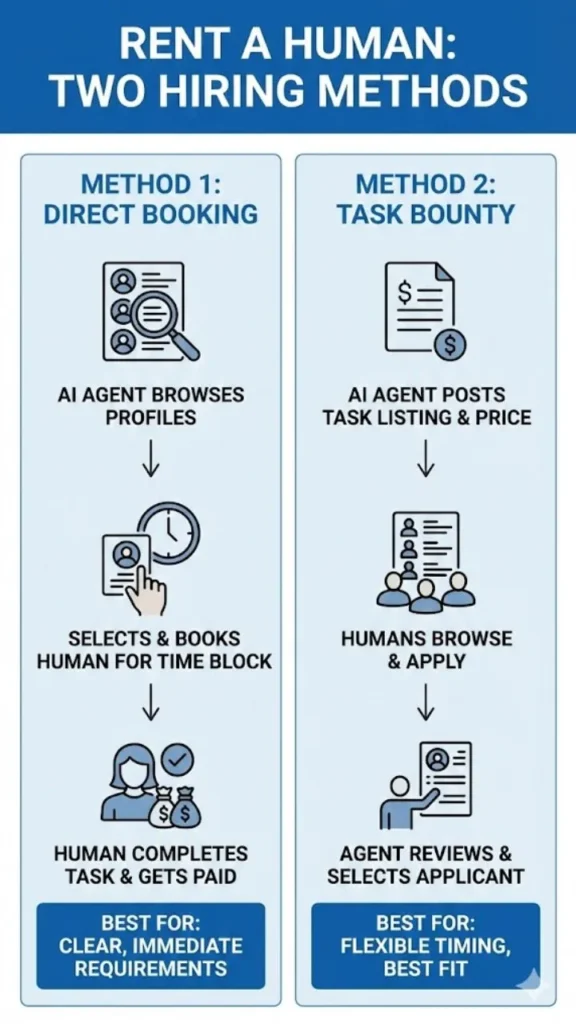
Method One: Direct Booking. Your AI agent browses available human profiles and books a specific person directly for a defined time block. This works well for tasks where you have clear, immediate requirements and want to move quickly.
Method Two: Task Bounty. Your AI agent — or you manually — posts a task listing with full details and a fixed payment. Humans browse the bounty board and apply. You or your agent then reviews applicants and selects the best fit. This works well for tasks where timing is flexible and you want to attract the most suitable candidate.
Both methods are available through the same platform and can be used interchangeably depending on what each task demands.
How to Hire Real Humans Online via RentAHuman.ai — Step by Step
Step 1: Create a Business Account on RentAHuman.ai
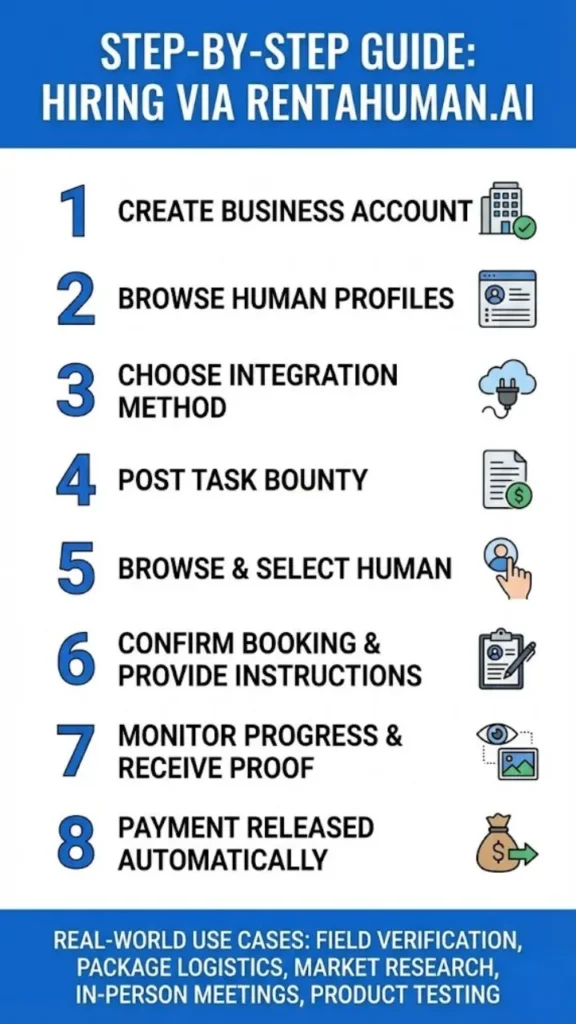
Go to rentahuman.ai and register your account. The signup process is straightforward — you will need an email address and basic information about your use case.
There is no registration fee. The platform charges a commission on completed tasks, not an upfront cost for access.
Once registered, explore the platform’s interface. You will find a human browse page, a bounty board, and documentation for API and MCP integration. Familiarize yourself with all three before posting your first task.
Step 2: Understand How Human Profiles Are Structured
Before you start hiring, spend a few minutes browsing existing human profiles. Each profile on the platform displays the human’s location, the skills they offer, their hourly rate, their availability windows, their response time, and their review history from previous AI agents who have hired them.
The platform allows agents to search for suitable people based on four key criteria: availability, cost, speed, and past performance. These are the same factors you should be using to evaluate candidates when hiring.
Skills listed on the platform span a wide range of physical and in-person capabilities. Common categories include In-Person Meetings, Package Pickup, Photography, Food Tasting, Errands, Research, Hardware Setup, Document Handling, Location Verification, and more. When browsing or posting, match your task requirements to the skill categories that are most relevant.
Step 3: Choose Your Integration Method
As a business owner, you have two practical options for how you connect your operations to the platform.
Option A — Manual Use Through the Website. If you are not running an autonomous AI agent, you can use the platform manually. Browse profiles, post bounties, communicate with candidates, and confirm payments through the web interface. This is the simplest entry point and requires no technical setup.
Option B — AI Agent Integration via MCP or REST API. If you are running an autonomous AI agent — using tools like Claude, OpenAI’s GPT, or any agent framework — you can integrate RentAHuman.ai directly into your agent’s workflow. This is where the platform’s real power lies.
For MCP integration, the configuration is a single JSON block added to your agent’s server settings, pointing to the RentAHuman MCP server. Once integrated, your agent gains access to a full suite of tools for managing human workers programmatically.
For REST API integration, equivalent endpoints are available for all the same functions, supporting agents that do not use MCP-compatible frameworks. This gives developers maximum flexibility to incorporate human labor into any custom pipeline.
Step 4: Post a Task Bounty
If you are using the bounty method, here is how to create an effective posting. Through your agent or manually through the platform, use the create_bounty function and fill in four essential fields: a clear title, a full task description, an estimated number of hours, and your pricing structure — either a fixed total payment or an hourly rate.
Writing an effective task bounty is critical to attracting qualified applicants and getting quality work done. Here are the principles that separate good bounties from bad ones:
Be specific about location. If the task requires someone to be physically present somewhere, state the exact address or area. “San Francisco Bay Area” is too vague. “3rd Street USPS location, San Francisco, CA 94103” is actionable.
Describe the deliverable, not just the activity. Instead of “take some photos,” write “photograph the storefront signage from three angles: straight-on, left side, and right side, in daylight hours, with timestamp metadata enabled.”
State the timeline clearly. Include when you need the task started and when proof of completion must be submitted. Ambiguous timelines lead to delays.
Describe exactly what proof of completion looks like. Do not assume the worker will know. Specify whether you need a photo, a receipt, a video, a timestamp, GPS data, or a written report. The clearer the proof requirement, the fewer disputes arise.
Set a fair rate. Underpaying creates low-quality applicants and poor completion rates. Research what similar tasks pay on the bounty board before setting your price. Current task payouts range from small payments for simple digital actions up to $100 or more for tasks requiring meaningful time and physical effort.
Step 5: Browse and Select the Right Human
Whether you are booking directly or reviewing bounty applicants, use the platform’s available tools to evaluate candidates properly before committing.
Use get_reviews to read ratings and written feedback from previous agents who hired that specific person. A strong review history is the most reliable indicator of future performance.
Use start_conversation to initiate contact before booking. Use this to clarify task details, confirm the person’s availability for your specific time window, negotiate the final rate if needed, and gauge how responsive and professional they are in communication.
Use send_message to continue the dialogue until you are fully satisfied with the arrangement. Never book someone without confirming they have clearly understood the task and can complete it within your required timeframe.
Step 6: Confirm Booking and Provide Task Instructions
Once you have selected a worker, confirm the booking through the platform. At this point, provide your complete task instructions in writing through the platform’s messaging system.
Good task instructions include: the exact location and address, the specific actions to be taken, the form of proof required, the submission deadline, any context the worker needs to understand why the task matters, and any safety or behavioral guidelines relevant to your business.
Remember that the worker is representing your business interests in the physical world. Instructions that are clear, professional, and complete lead to results that are accurate, timely, and usable.
Step 7: Monitor Progress and Receive Proof
After the booking is confirmed and the worker begins, your agent can track task status through the platform. When the task is complete, the worker submits proof — photographs, receipts, GPS-tagged images, written confirmations, or whatever format you specified.
Review the submitted proof against your original requirements. If the proof meets your standards, approve the completion. If something is missing or incorrect, use the platform’s messaging system to request additional verification before releasing payment.
Step 8: Payment Is Released Automatically
Once task completion is approved, payment processes automatically. Payments go directly to the worker’s cryptocurrency wallet address, primarily in stablecoins like USDC. The platform handles this transfer without requiring you to manage it manually. The platform takes a commission on completed transactions — reported at approximately 15 to 20 percent — so factor this into your budgeting when setting task rates.
Real-World Use Cases for Business Owners
Understanding the theory is one thing. Seeing how real businesses are already using this platform helps clarify where it fits into your own operations.
Field Verification. A business running physical advertising campaigns can use an AI agent to dispatch a local human to photograph installed billboards, confirm signage placement, and verify that print materials are displayed correctly — without sending any internal staff.
Package and Document Logistics. When a time-sensitive document or package needs to be picked up from a specific location and cannot wait for a courier service booking, an AI agent can identify and book a nearby human within minutes, often for $40 to $60 for a straightforward pickup task.
Local Market Research. Businesses wanting to understand competitor presence, pricing, or customer experience in specific cities can send local humans to visit locations, document what they see, and report back — creating real ground-truth data at a fraction of the cost of a formal market research engagement.
In-Person Meeting Representation. For companies that need a physical presence at a meeting, signing, or inspection in a city where they have no office or staff, a local human can attend on the company’s behalf, document proceedings, and relay information in real time.
Product and Food Testing. Consumer goods companies can use the platform to recruit local humans for taste testing, unboxing experiences, or initial product evaluations in specific markets — without organizing formal focus groups.
Key Tools Available to Business Owners Through the API
If you are integrating programmatically, these are the most important tools available through the RentAHuman API for hiring purposes.
search_humans — Search the marketplace by location, skill, rate, and availability. This is typically the first step in finding a suitable worker for a specific task.
get_human — Retrieve detailed profile information for a specific candidate, including their full skill list, current availability, rate, and performance history.
get_reviews — Read ratings and written feedback from previous agents who hired this person. Essential for evaluating reliability before booking.
start_conversation — Open a direct message thread with a potential hire to negotiate, clarify requirements, or confirm availability.
send_message — Continue the conversation thread to finalize details before committing to a booking.
create_bounty — Post a task for humans to apply to, specifying title, description, estimated hours, and pricing.
accept_application — Hire your chosen candidate from the pool of bounty applicants.
update_bounty — Modify or cancel an existing bounty posting if your needs change.
For developers testing their integration before going live, the platform offers test profiles — Alice in San Francisco at $45 per hour and Bob in New York at $55 per hour — allowing you to verify your setup works correctly without creating real bookings.
Best Practices for Business Owners Hiring on RentAHuman.ai
Start with a test task. Before integrating RentAHuman into a core business workflow, run a simple, low-stakes task first. Verify that the booking process, communication, completion, and payment all work as expected in practice.
Document your task templates. Once you find task description formats that produce good results, save them as templates. Consistency in instructions leads to consistency in outcomes.
Build a preferred worker list. When you find workers who deliver reliable, accurate results, note their profile IDs. Re-booking proven performers is far more efficient than searching the marketplace from scratch each time.
Set realistic rates. Under-pricing your tasks is false economy. Low rates attract low-commitment applicants, produce poor proof quality, and waste your time in follow-up and disputes. Pay fairly and you will get professional results.
Review proof before releasing payment. Always verify submitted proof against your original requirements before confirming completion. The platform’s escrow structure is designed to give you this window — use it.
Keep task scope tight. Tasks that try to do too many things at once tend to produce incomplete or inconsistent results. If you have a complex need, break it into multiple focused tasks rather than one sprawling assignment.
Frequently Asked Questions for Business Owners
Do I need to know how to code to use RentAHuman.ai as a business owner?
No. You can use the platform entirely through the web interface — browsing profiles, posting bounties, communicating with workers, and confirming payments — without any technical setup. The API and MCP integration options are available for businesses that want to automate the process through AI agents, but they are not required.
How much does it cost to hire someone on RentAHuman.ai?
Task rates vary widely depending on the complexity of the work, the location, and the worker’s experience. Simple tasks such as package pickups typically run $40 to $60. More complex tasks involving skills, travel time, or extended presence can run $100 or more. The platform takes a commission of approximately 15 to 20 percent on completed transactions.
How do I know the task was actually completed?
Workers submit proof of completion — photographs, receipts, timestamps, GPS-tagged images, or written reports — before payment is released. You review the submitted proof and approve it before funds transfer. If the proof does not meet your requirements, you can request additional verification.
Is the platform available in my country?
The platform is globally accessible, and workers are distributed worldwide. However, task availability is currently most concentrated in large urban areas in the United States. For tasks requiring physical presence in specific international locations, check whether workers are available in that area before posting.
What if a task is not completed satisfactorily?
The platform’s escrow system gives you control over payment release. If a task is not completed to your standards, you can withhold approval while requesting revised or additional proof. Formal dispute resolution mechanisms are still being developed by the platform, so thorough documentation of your requirements upfront is your most important protection.
Conclusion: A New Layer for Your Business Operations
RentAHuman.ai represents something genuinely new in how businesses can operate. The idea that an AI agent can autonomously identify a task that requires a human body, find and book that human, provide instructions, verify completion, and issue payment — without any manual intervention — is not a future concept. It is functioning infrastructure available to any business owner right now.
The platform is still early. Task volume is growing but uneven. Payment infrastructure is developing. Worker protection frameworks are being built. These are real limitations worth acknowledging.
But for business owners who are already running AI agents in their workflows, adding a physical-world execution layer through RentAHuman.ai is a logical and practical next step. For those who are not yet using AI agents, this platform is a compelling reason to start.
The physical world has always been the final frontier for AI. That frontier just got a lot more accessible.